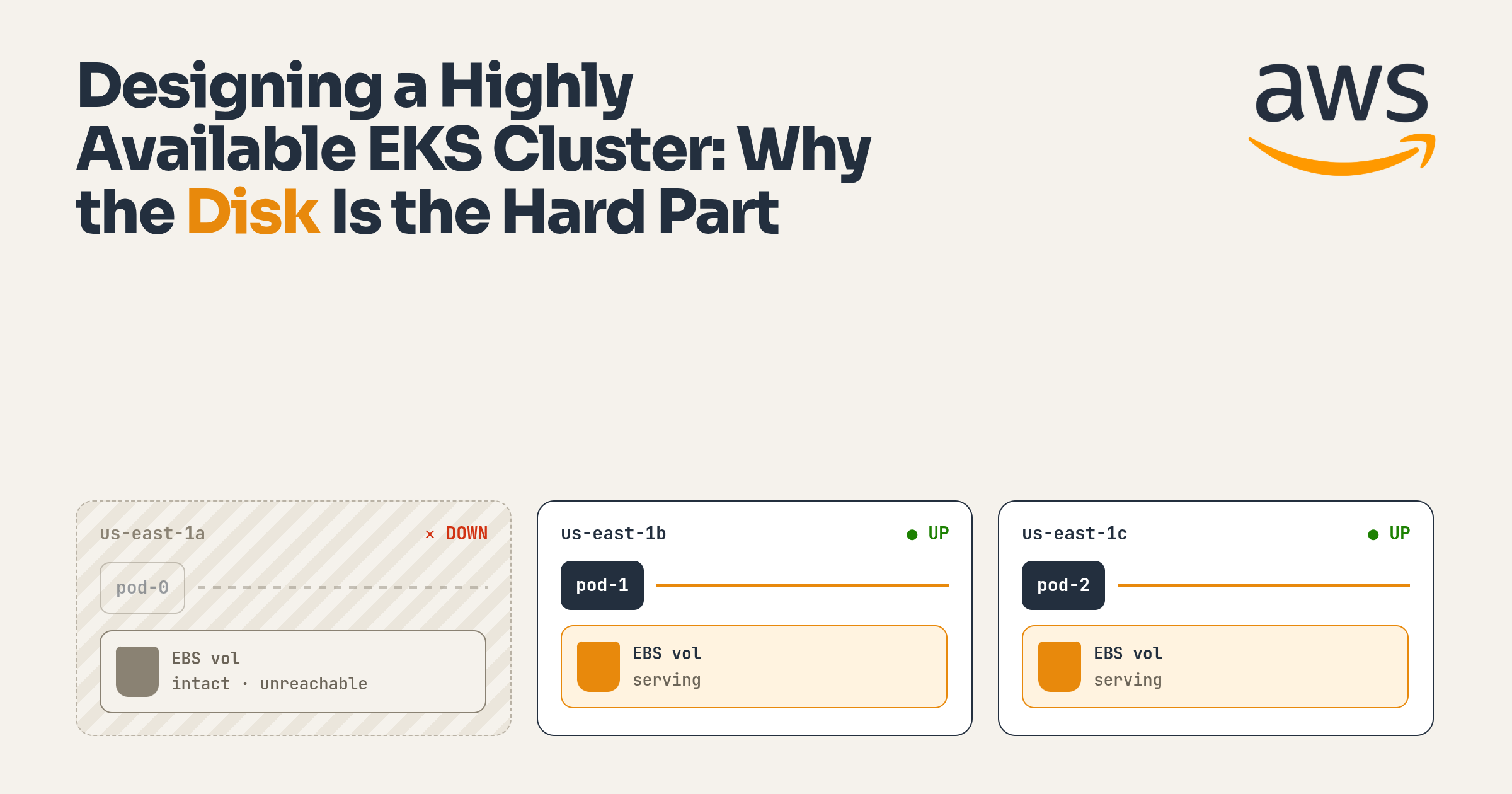
Ask me before I started preparing for an interview what a highly available EKS cluster looked like and I would have said: nodes in three Availability Zones, replicas spread across them, a load balancer in front. That is the right shape, and it is the easy half. The hard half arrived partway through the preparation as a question I could not answer: if a node dies, why does its EBS volume go down with it? EBS is network storage. It is not inside the instance. So why does every discussion of HA treat a stateful pod as something that dies with its zone?
The answer is that the volume does not die with its node, and it does die with its AZ, and the gap between those two sentences is the whole subject. “Highly available” is only ever a claim about failure domains: which things can disappear together, and what you have arranged to survive it. This post walks the EKS stack by failure domain, quickly for the parts that just reschedule and slowly for the storage, since that is where I was stuck.
The control plane is AWS’s problem
You do not design this part. The EKS resilience page says the control plane is at least two API server instances and three etcd instances across three Availability Zones in the region, that EKS replaces unhealthy instances across those zones, and that this is what backs the SLA on the API endpoint. There is no setting that puts it in one zone. Everything below is the data plane, and the data plane is yours.
Nodes: three AZs, and room for one to be missing
A node’s AZ is decided by its subnet. Managed node groups and Karpenter NodeClasses both select subnets, so give them subnets in three zones and nodes land in all three. Then size for the loss of one. If a zone is gone, the other two have to hold everything, which means either a third of your capacity idle or an autoscaler you trust to replace it fast enough. Neither is free. I do not have production numbers to pick one for you, but choosing between them is the actual design decision.
EBS adds a catch. The EKS data plane guidance puts it plainly: the scheduler will always place a pod that needs an EBS volume in the volume’s zone, and if there is no node in that zone the pod cannot be scheduled. The Cluster Autoscaler’s AWS README draws the consequence: one Auto Scaling group spanning several AZs can scale up in the wrong one, so for EBS workloads you run either a single-AZ group or one group per AZ with --balance-similar-node-groups. Karpenter sidesteps this by reading the volume’s zone from the claim and launching the node where the disk already is. It does not balance zones on its own, though; its docs leave that to the pod’s spread constraints.
Pods: spread them, then budget the disruptions
Three replicas on three nodes in one AZ is one failure domain with extra steps. The fix is a topology spread constraint keyed on the zone label:
topologySpreadConstraints:
  - maxSkew: 1
    topologyKey: topology.kubernetes.io/zone
    whenUnsatisfiable: ScheduleAnyway
    labelSelector:
      matchLabels:
        app: api
maxSkew: 1 is the target: no zone more than one pod above the emptiest. Whether that is a rule or a preference is whenUnsatisfiable. DoNotSchedule makes it a rule and leaves pods Pending when the spread cannot be met; ScheduleAnyway, which the block uses, makes it a preference the scheduler weighs while still placing the pod. The EKS guidance says to use DoNotSchedule only if you would rather have fewer pods than an uneven spread, and during a zone outage, uneven is exactly what you want. The older way is pod anti-affinity on the same key, and the same guidance warns against making it required, since then a Deployment can never have more replicas than you have zones.
Spreading covers the zone failing. A PodDisruptionBudget covers you failing the zone yourself. minAvailable: 2 on a three-replica service means a node drain, a managed node group upgrade or an autoscaler scale-down cannot take a second replica until the first is back, because all of those go through the Eviction API and honour the budget. The disruptions docs are equally clear about what it does not do: involuntary disruptions cannot be prevented by PDBs, they only count against the budget. A PDB will not save you from an AZ outage, a boundary the PDB post spends some time on. It will stop you draining a node in the surviving zones while one is down, which is the moment it earns its keep.
Storage: where I got stuck
The EBS documentation settles my question in two sentences. EBS volumes persist independently from the running life of an EC2 instance. The volume and instance must be in the same Availability Zone. My instinct was right, the disk is not in the node, and it was incomplete: the disk is in the zone.
So when a node dies, the volume is still there. The pod reschedules, the volume detaches from the dead node and attaches to the new one, as long as the new one is in the same AZ. If the node vanished without a clean shutdown, the attach/detach controller waits six minutes before force-detaching, according to the EBS CSI driver FAQ, so a stateful pod on a dead node is back in six-plus minutes. That delay is the controller choosing a slow recovery over a corrupted disk. When the whole zone dies, the volume is in it. Nothing is deleted, but there is nothing in that zone to attach it to, and the data is unreachable until the zone comes back.
Deleting the pod does not touch the volume either. The pod is a consumer of a PersistentVolumeClaim; the claim is bound to a PersistentVolume; the EBS volume sits behind that. Delete the pod and both stay. Delete the claim and the StorageClass’s reclaimPolicy decides: Delete is the default, Retain keeps the EBS volume for you to deal with by hand. The other StorageClass field that matters here is volumeBindingMode. The default, Immediate, provisions the volume the moment the claim is created, which the StorageClass docs say happens without knowledge of the Pod’s scheduling requirements and may result in unschedulable Pods: a disk in zone A and a pod that only fits in zone B. WaitForFirstConsumer waits until the pod is scheduled and creates the volume in whichever zone it landed, which is why the EBS CSI driver’s own example StorageClass sets it. The two fields from this section, in one class:
apiVersion: storage.k8s.io/v1
kind: StorageClass
metadata:
  name: ebs-sc
provisioner: ebs.csi.aws.com
volumeBindingMode: WaitForFirstConsumer
reclaimPolicy: Retain
Put that together with the spread constraint above and a StatefulSet does something useful. Three replicas spread across three zones each get their own claim, so each gets its own EBS volume, created in its pod’s zone. Lose a zone and you lose one replica and one disk; the other two keep serving. EBS replicated nothing across zones. The application did, and it has to be an application that does: Postgres with replicas spread across the zones, or Kafka with broker.rack set to the zone so each partition’s replicas land in different zones, on top of the replication model the Kafka post walks through. The managed version of the same idea is RDS Multi-AZ, which the RDS docs describe as a synchronous standby in a different Availability Zone, with the honest footnote that synchronous replication raises write and commit latency.
EFS is regional, which is the point and the catch
My next question was whether EFS was not also sitting in an AZ. It is not. One EFS file system has a mount target in each AZ of the VPC, and the EFS docs say the file system’s DNS name resolves to the mount target in the same zone as the instance asking, with instances in multiple zones accessing the same file system concurrently. If zone A fails, pods in zone B mount the same files through their own mount target, and you replicated nothing yourself. That is the entire argument for it.
The catch is that this is NFSv4 over the network, not a block device. AWS’s performance table lists best-case per-operation latency for a Regional file system at about 1 ms for reads and about 2.7 ms for writes, and file semantics are not what a database engine expects underneath it. EFS fits things many pods read and write as plain files, uploads and shared content being the usual ones. It does not fit Postgres. And EFS One Zone exists, with a single mount target, which hands the AZ problem straight back.
Traffic has to cross zones too
An ALB requires at least two AZs enabled and, per the ELB docs, has cross-zone load balancing always on at the load balancer level, so a request arriving at the zone A node can reach a pod in zone B. An NLB has it disabled by default, meaning each load balancer node sends only to targets in its own zone; turn it on, or a zone with few healthy pods gets the same share of traffic as a full one. CoreDNS is an application like any other: replicas spread across zones and a PDB, or the CoreDNS autoscaling EKS ships.
Crossing a zone costs a cent each way
Everything above moves bytes between AZs, from replication streams to a pod in A calling a service whose pod happens to be in B. AWS bills inter-AZ traffic at $0.01 per GB in each direction, so each gigabyte crossing a zone boundary is two cents. HA is a tradeoff, and this is the line of the bill it shows up on.
Ending notes
The sentence that answers my original question, and that I would now give in an interview, is: pick storage that matches your failure domains. Stateless pods reschedule anywhere. An EBS volume lives in one zone, so surviving that zone means replicating above it, in the database or in a managed Multi-AZ service, and plain files that several pods share can sit on EFS and let the regional file system do the surviving. Everything else in the post is there to make sure something is left in the other two zones to pick up the work.
Two commands show the failure domains on a cluster you did not build. kubectl get nodes -L topology.kubernetes.io/zone adds a column with each node’s zone, so you can see whether “three AZs” is true or aspirational. kubectl get sc -o custom-columns=NAME:.metadata.name,BINDING:.volumeBindingMode,RECLAIM:.reclaimPolicy shows whether each StorageClass waits for the pod before picking a zone, and whether deleting a claim takes the disk with it.
Thanks for your time :)