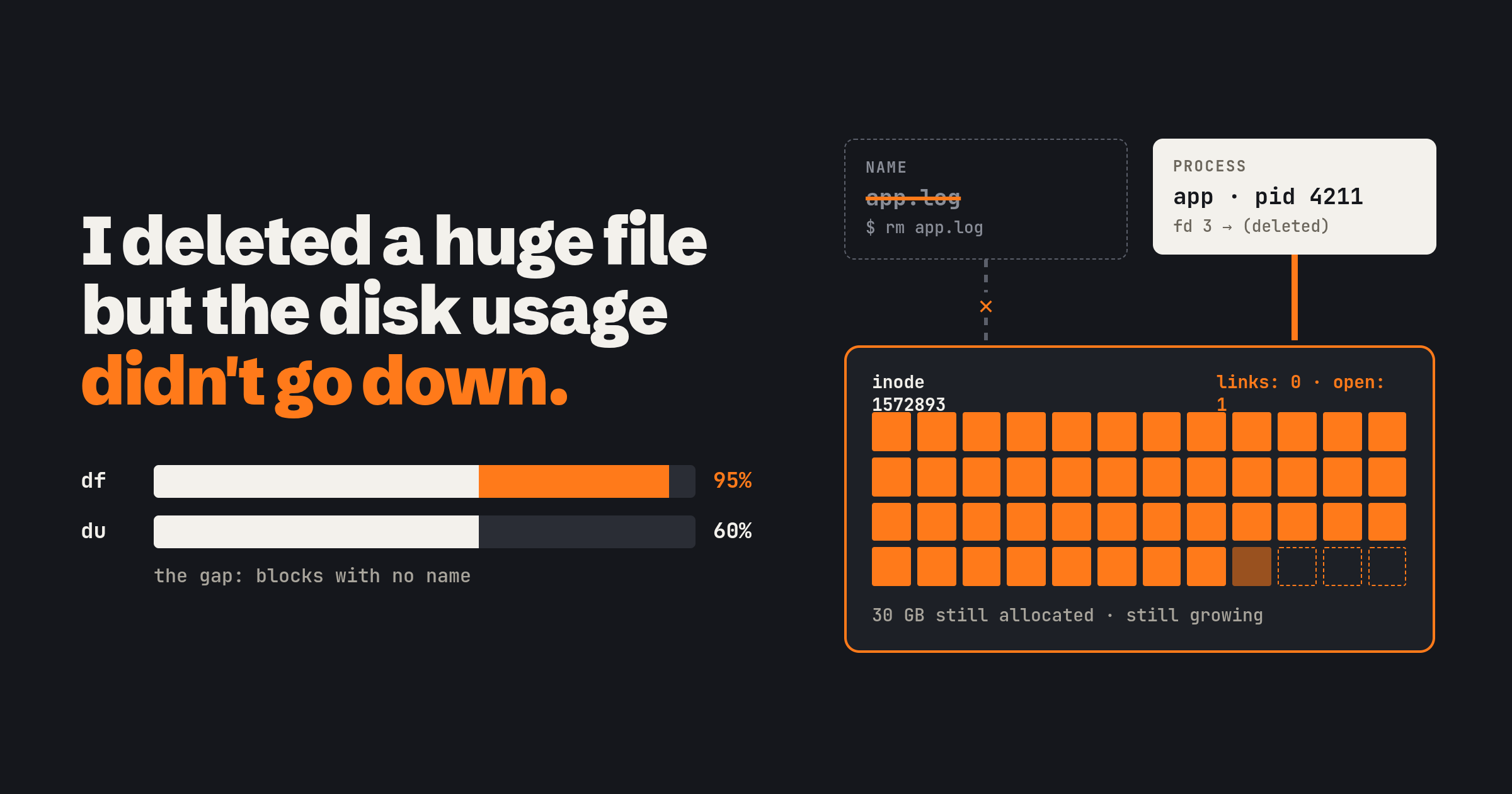
The sequence is familiar to anyone who has run a Linux box for long enough. df -h says the root filesystem is at 95%. du finds a log file the size of a small database, you rm it, you run df again, and the number has not moved. Run du now and it adds up to 60%. The two tools disagree by a third of the disk, and the file you just deleted is nowhere.
I knew the sequence long before I knew the reason, and the reason is one sentence: rm removes a name, not a file. Everything else in this post follows from that.
A file is an inode, a name is a link to it
On a Linux filesystem the thing you think of as a file is two separate things. The inode holds the data blocks and the metadata: size, owner, permissions, timestamps, a link count, and the pointers (or extents) to where the data lives. The filename is not in there. Names live in directories, and a directory entry is nothing more than a name pointing at an inode number. ls -li shows both the number and, in the column after the permissions, the link count: how many names point at that inode.
$ ls -li /var/log/app.log
1572893 -rw-r--r-- 1 app app 31457280000 Nov  5 09:12 /var/log/app.log
rm calls unlink(), and the man page is exact about what that does. It removes the name and decrements the link count. If that was the last name and no process has the file open, the file is deleted and its space is made available. If any process still has it open, the file remains in existence until the last file descriptor referring to it is closed. Two counters have to reach zero: names, and open descriptors across every process on the machine. rm only touches the first.
So a process that opened the log before you deleted it still holds a working descriptor to a perfectly good inode. It keeps appending, the inode keeps acquiring blocks, and the filesystem keeps counting them. The only thing that changed is that no path leads there any more.
This is deliberate. Decoupling names from data is what lets a package manager replace a running binary on disk while the old copy keeps running from its now-nameless inode, and it is how temporary files have always worked: open, unlink, keep using, and the kernel cleans up when the process exits. Windows takes the other route and locks files while they are open.
Why df and du disagree
They measure different things. du walks the directory tree, so it can only count files that have a name. df asks the filesystem itself, through statfs, and the filesystem answers from the free-block counters in its superblock, which know nothing about names. A deleted-but-open file has no name and still has blocks, so du cannot see it and df cannot miss it.
That is the signature. df at 95% and du adding up to 60% with nothing else to explain the gap means something is holding a deleted file open, and the gap is roughly how much.
Finding what is holding it
lsof can list open files whose link count is below one, which is exactly the set of files that have been unlinked:
$ sudo lsof +L1
COMMAND  PID USER  FD   TYPE DEVICE    SIZE/OFF NLINK    NODE NAME
app     4211  app   3w   REG  259,2 31457280000     0 1572893 /var/log/app.log (deleted)
PID, descriptor number, the size still held, and the path it was opened under. lsof -nP | grep '(deleted)' gets you the same rows. On a minimal host without lsof, go straight to where lsof reads it from:
$ sudo find /proc/*/fd -ls 2>/dev/null | grep '(deleted)'
 38817  0 l-wx------  1 app  app  64 Nov  5 09:12 /proc/4211/fd/3 -> /var/log/app.log (deleted)
Each entry in /proc/<pid>/fd/ is a symlink to whatever the descriptor points at, and the kernel appends (deleted) to the target when the name has been unlinked. That suffix is the whole trick behind both commands.
Making the process let go
In order of preference.
Tell the process to reopen its log. Most daemons reopen on a signal; SIGHUP is the convention, and nginx uses SIGUSR1, with its docs describing the master process re-opening every log file and then asking the workers to do the same. The old descriptor closes, the second counter reaches zero, and the blocks are freed. Nothing restarts.
Restart it. Every descriptor closes with the process. Blunter, and fine when a restart is cheap.
If you cannot restart it, truncate the file through the descriptor:
$ sudo truncate -s 0 /proc/4211/fd/3
: > /proc/4211/fd/3 does the same with a shell redirect. Opening the /proc symlink opens the inode behind it, and truncating that to zero frees the blocks on the spot. The process never notices and carries on appending. The one wrinkle is a writer that did not open the log with O_APPEND: its offset stays where it was, so the next write lands at the old position and the file gets a hole at the front, which costs no space but reads as a long run of zeros.
The same symlink is the way back in when the file was deleted by mistake. As long as the process is alive, cp /proc/4211/fd/3 /tmp/recovered copies the data out. Kill the process first and it is gone for good.
Stopping it happening again
Almost every time, the file is a log and the real fault is rotation. logrotate renames the file, the app keeps writing to the renamed inode, and sooner or later someone deletes the “old” file that is secretly the live one. The clean rule is create plus a postrotate script that signals the app to reopen, so the app moves to the new name and the old inode is closed. For an app that cannot reopen, copytruncate copies the file and truncates the original in place, and the man page is honest that there is a small window between the copy and the truncate in which lines are lost. Both rules, and what else goes wrong with them, are in the logrotate post.
The alert belongs on the filesystem, not on the gap. With node_exporter, node_filesystem_avail_bytes / node_filesystem_size_bytes is the ratio to watch (avail rather than free, because it already subtracts the root reserve from the table below), and predict_linear over a few hours turns “95% full” into “full in four hours”, which is the version worth being paged for:
predict_linear(node_filesystem_avail_bytes{mountpoint="/"}[6h], 4 * 3600) < 0
node_filesystem_files_free is the same idea for inodes. The df versus du gap is something you check by hand once the alert fires, not something to alert on.
The other ways a disk is full
When lsof +L1 comes back empty, the same symptom has a few other causes, each with a one-line check.
| Symptom | Cause | Check |
|---|---|---|
“No space left on device” but df -h shows free space |
Inode exhaustion: millions of tiny files (sessions, cache, a mail queue) | df -i |
| Non-root processes fail at about 95% | ext4 reserves 5% of blocks for root by default | tune2fs -l, change it with tune2fs -m |
du of / does not match df, and nothing is deleted |
Files were written into a directory before a filesystem was mounted over it, so the mount hides them | mount --bind / /mnt/root, then du /mnt/root/<dir> |
rm of one name frees nothing, and nothing has it open |
A hard link: another name still points at the inode | ls -li, find / -samefile <file> |
The last row is the rule from the start of the post seen from the other side. The link count was 2, rm took it to 1, and an inode that still has a name is not deleted.
The same thing on a Kubernetes node
Nothing above changes on a node. It just has more processes writing logs and a kubelet watching the disk.
Container stdout and stderr land in files under /var/log/pods, and the kubelet rotates those itself, by containerLogMaxSize (default 10Mi) and containerLogMaxFiles (default 5) in its config. An app that writes its logs to a file inside the container is outside that. Nothing rotates the file, it grows in the container’s writable layer, and the fix is to send it to stdout or give it a volume.
When the root filesystem (nodefs) or the image filesystem (imagefs) crosses an eviction threshold, by default nodefs.available<10% and imagefs.available<15%, the node reports DiskPressure. The kubelet first reclaims what it can on its own, garbage-collecting dead pods and containers and then deleting unused images, and only then evicts pods. nodefs.available comes from the same filesystem counter df reads, so a deleted-but-open file counts fully against it, and the kubelet will happily evict pods to make room for a file nobody can see.
ephemeral-storage requests and limits are the per-pod version. The kubelet measures a pod’s emptyDir volumes, its log directories and its writable layers against the limit, and evicts the pod when it goes over. That log file inside the container counts.
The last place a descriptor hides is the log collector. Fluent Bit, Promtail and the rest tail by inode rather than by path, so rotation does not cost them the tail of the old file, and they keep a rotated file open until they have finished reading it. Under a burst that can make the collector the process lsof +L1 points at. Why collectors work that way is in the log collection post.
Ending notes
A file is an inode. A name is a link to it. rm drops the link, and the kernel frees the blocks only when the link count is zero and nobody has the inode open. du counts names and df counts blocks, which is why they disagree, and the fix is never to delete harder. Find the descriptor with lsof +L1, then make the process let go: reopen, restart, or truncate through /proc/<pid>/fd.
The quickest way to see it for yourself is ls -li on any log, then ls -l /proc/<pid>/fd for the process writing it. Delete the file and look at the symlink again. The name is gone, the descriptor is still there marked (deleted), and so is the space.
Thanks for your time :)