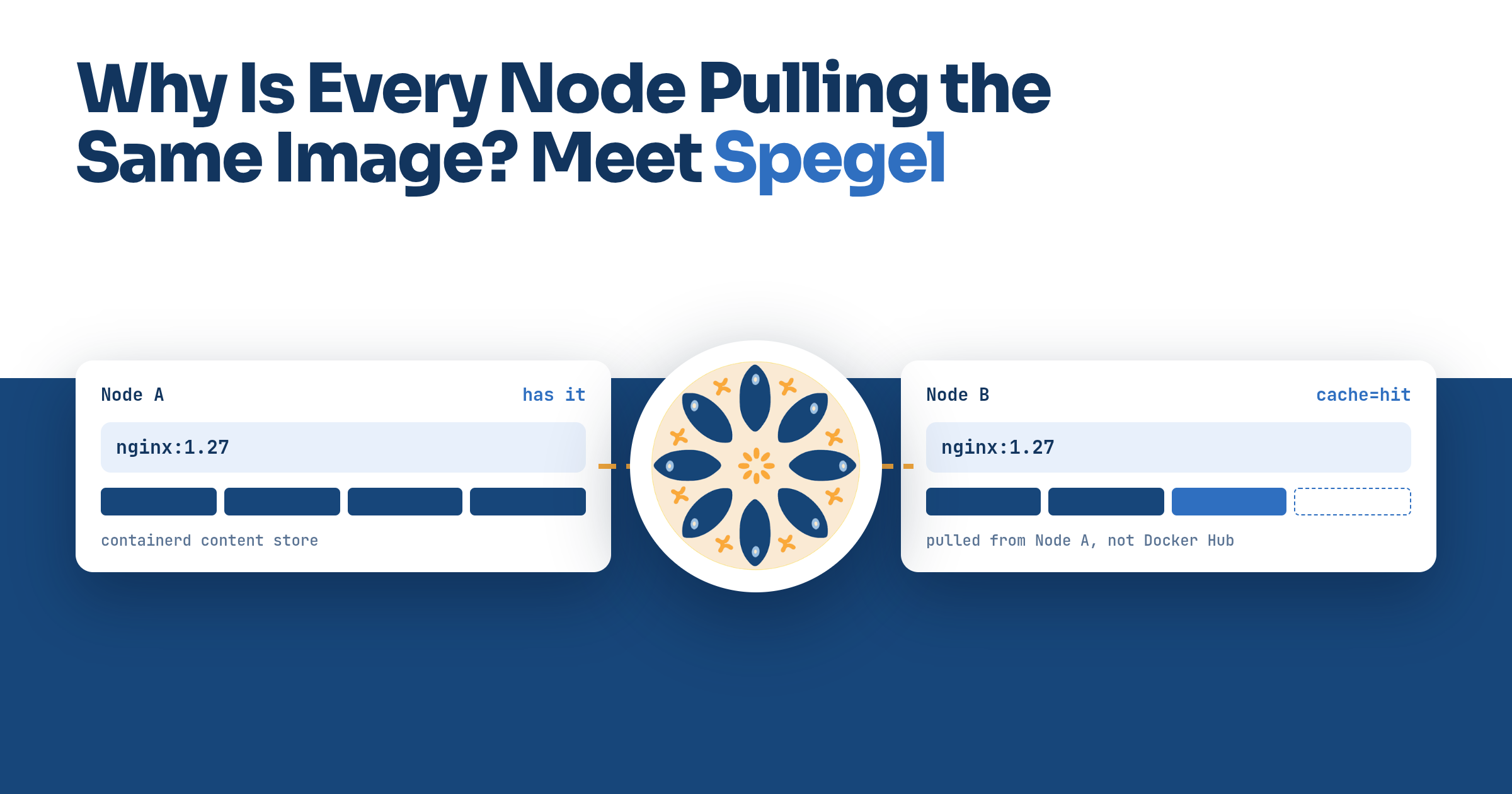
I had read the one-line description of Spegel, a stateless cluster-local OCI registry mirror for Kubernetes, and nodded along, and then got stuck on the most basic question about it. Node A has already pulled nginx:1.27. Node B has not, and a pod for it has just been scheduled there. Node B is about to go to Docker Hub. What exactly does Spegel do in that moment? The whole tool is in the answer, so this post starts there and fills in the rest around it.
Two nodes, one image
Without Spegel the answer is nothing, because nothing is there to do it. containerd on Node B resolves docker.io/library/nginx:1.27, fetches the manifest from Docker Hub and downloads every layer over the internet. The identical bytes are sitting on Node A’s disk one network hop away, and Node B has no way of knowing that. Multiply by however many nodes a Deployment lands on and you have the list from Spegel’s README: Docker Hub rate limits, a registry outage that blocks new pods even though the image is already in the cluster, slow starts for large images, and egress paid once per node.
With Spegel, every node runs a Spegel pod, and containerd on every node has been told, through its registry mirror config, to try a mirror on the node itself before the upstream registry. So Node B’s containerd asks the Spegel pod on Node B for the manifest, then for each blob, by digest. Node B’s Spegel does not have them, so it asks the cluster who does. Node A’s Spegel advertised those digests when Node A pulled the image, so the lookup comes back with Node A. Node B’s Spegel fetches the blob from Node A’s Spegel, which reads it straight off Node A’s disk, and streams it back to containerd. The image crosses the cluster network instead of the internet, and Docker Hub is never contacted.
If nobody has it, Node B’s Spegel answers 404 and containerd moves on to Docker Hub, which is what it would have done anyway. containerd’s hosts docs describe the rule: mirror hosts are tried in order, and the upstream server is used as a fallback once they are exhausted. The peer lookup gives up after 20 ms by default, per request. containerd asks the mirror once for the manifest and once per blob, so an image nobody has costs a few of those on top of the pull that was going to happen regardless. The project’s FAQ calls it a best-effort cache, and that is the right amount of trust to put in it. The caveats are in the same answer. A node that dies keeps its digests advertised for up to 10 minutes, so a peer that picks it first waits on a timeout before trying another, and pod start can be materially slower when an image is mostly one large layer or when nodes are far apart, as at edge sites. The mutable-tag case is its own gotcha, further down.
Two jobs per node
Spegel, mirror in Swedish, was first developed at Xenit AB by Philip Laine, who, his FOSDEM 2025 speaker page says, was a core maintainer of Flux before it. It ships as a Helm chart that installs a DaemonSet, one pod per node, and each pod does two jobs: it is the mirror its own node’s containerd talks to, and it is a registry that other nodes pull from.
The mirror half rides on containerd’s hosts configuration. config_path points containerd at a directory, by convention /etc/containerd/certs.d, and a hosts.toml under it says which mirrors to try before the real registry. Spegel writes that file itself when it starts, covering every registry unless you list specific ones in mirroredRegistries. The host it writes in is not localhost. It is the node’s own IP on port 30020, a NodePort whose Service is set to prefer the pod on the same node, so the request still ends up at the local Spegel. Spegel can do this at startup because containerd reads the directory on the fly; the hosts docs say updates under it do not require restarting the daemon. Nothing in a workload changes. Pods keep saying nginx:1.27.
The discovery half is libp2p and its Kademlia DHT, both direct dependencies in the project’s go.mod. Each Spegel pod advertises the digests present on its node into the DHT, with a TTL of 10 minutes per the FAQ, and a lookup is by digest. That is why it is safe to take a layer from whichever node answers: layers are content-addressed, and containerd verifies the hash of what it receives, so a peer cannot hand it the wrong bytes without being caught.
Where the bytes actually live
Spegel has no storage of its own. When Node A pulled nginx, containerd wrote the compressed layers into its content store, which keeps each blob as a file under blobs/<algorithm>/<digest>. The Helm chart’s containerdContentPath defaults to the store root, so a layer on Node A is at:
/var/lib/containerd/io.containerd.content.v1.content/blobs/sha256/<digest>
That file is there with or without Spegel. The Spegel pod mounts the containerd socket (/run/containerd/containerd.sock by default) and that content directory, uses the socket to learn which blobs the node has so it can advertise them, and reads the file when a peer asks. It is a window into containerd’s cache, not a copy of it. There are no PVCs, and a Spegel pod restart loses nothing because the data was never Spegel’s.
The flip side is that an image is shareable only for as long as containerd keeps it on some node. Deleting the pod that used it changes nothing; containerd keeps the image. What removes it is whatever removes it from containerd. The kubelet’s image garbage collection runs every five minutes, and once disk usage passes HighThresholdPercent it deletes images oldest-last-used first until usage is back under LowThresholdPercent. A replaced node takes its disk with it, and crictl rmi is the manual version. Spegel has no garbage collection of its own and relies on the kubelet’s, which the FAQ warns is disabled by default on some clusters, with full node disks as the result.
Rebuild the whole cluster and the cache is empty, so the first pull of every image goes to the real registry again. This is why Spegel does not replace a persistent pull-through cache like Harbor or Zot, which have their own storage and survive a rebuild. The FAQ shows Zot as a secondary mirror via additionalMirrorTargets, so a miss in the cluster goes there before it goes to the internet.
Before you install it
Spegel only works with containerd. CRI-O and Docker Engine are out.
config_path must be set in containerd’s config, and setting it needs a containerd restart that Spegel cannot perform for you, so on self-managed nodes it belongs in the node image or bootstrap config. Spegel exits on startup if containerd is not configured correctly, which at least makes this one loud.
discard_unpacked_layers must be false. containerd’s CRI config describes it as allowing GC to remove layers from the content store after successfully unpacking them to the snapshotter. Upstream it defaults to false, but Spegel’s docs say some distributions enable it, and kind does. With it on, the compressed blobs Spegel would serve are gone, the unpacked snapshot is useless to a peer, and Spegel installs fine with no layers to serve. This is the quiet failure, and the first thing to check.
A private image becomes a cluster-wide image. Once one node has pulled it with credentials, every other node can get its layers from Spegel without any, because credentials are not sent to a registry mirror. The FAQ says a good solution does not exist yet. The usual workaround, an always-pull policy for private images, only makes every pod start depend on the registry, and the FAQ’s own conclusion is that if you have these requirements Spegel may not be the choice for you. On a multi-tenant cluster, decide this before installing.
Tags are resolved through peers by default (resolveTags: true). Once latest has resolved to a digest somewhere in the cluster it keeps resolving to that digest while the image is around, which can block an update you pushed upstream. The tag resolution page gives the options: turn resolution off, or exclude :latest$ with registryFilters and let the registry answer for that tag. Digests are never a problem.
Check your distribution first. K3s and RKE2 embed Spegel as their embedded registry mirror, switched on with --embedded-registry on servers or the matching config-file key, and K3s does not share latest between nodes by default. The compatibility section of Spegel’s getting started guide rates each flavour and lists the extra configuration it needs.
Try it on kind
Use kind v0.30.0 or later, the first release whose default node image is Kubernetes 1.34. The chart’s registry Service sets trafficDistribution: PreferSameNode, which the API server only accepts from 1.34 on, where its feature gate is on by default. On anything older helm exits with a validation error on spec.trafficDistribution for that Service. Helm creates the rest of the chart regardless, so the DaemonSet turning up is not evidence that the install worked; stop at the error, because without that Service containerd has no mirror to reach and the counter at the end stays empty. The node images already set config_path, so that half of the patch below is harmless and only spells out what kind does anyway; kind’s base image turns discard_unpacked_layers on, so that line is the one that matters.
kind: Cluster
apiVersion: kind.x-k8s.io/v1alpha4
containerdConfigPatches:
- |-
  [plugins."io.containerd.grpc.v1.cri".registry]
    config_path = "/etc/containerd/certs.d"
  [plugins."io.containerd.grpc.v1.cri".containerd]
    discard_unpacked_layers = false
nodes:
- role: control-plane
- role: worker
- role: worker
Create the cluster, install the chart and wait for the DaemonSet, pin a first pull to one worker and wait for it to finish, create a three-replica Deployment and wait for that too, then read the mirror counter off the Spegel pod on the other worker through the API server’s pod proxy. None of the waits is optional. helm returns before the Spegel pods have written hosts.toml, and a pull that happens before that goes straight to Docker Hub and never touches the mirror. kind-worker has to finish its pull before kind-worker2 starts asking, because Spegel advertises each blob as containerd commits it; an overlapping pull takes whatever has landed from the peer and the rest from Docker Hub, and the counter shows a mix of hits and misses instead of a clean run.
kind create cluster --config kind.yaml
helm upgrade --create-namespace --namespace spegel --install spegel \
  oci://ghcr.io/spegel-org/helm-charts/spegel
kubectl rollout status -n spegel daemonset/spegel
kubectl run first --image=nginx:1.27 \
  --overrides='{"spec":{"nodeName":"kind-worker"}}'
kubectl wait --for=condition=Ready pod/first --timeout=120s
kubectl create deployment web --image=nginx:1.27 --replicas=3
kubectl rollout status deployment/web
POD=$(kubectl get pod -n spegel -l app.kubernetes.io/name=spegel \
  --field-selector spec.nodeName=kind-worker2 -o jsonpath='{.items[0].metadata.name}')
kubectl get --raw "/api/v1/namespaces/spegel/pods/$POD:9090/proxy/metrics" \
  | grep spegel_mirror_requests_total
Any replica that lands on kind-worker2 has to get its layers from kind-worker, and spegel_mirror_requests_total is the proof. It counts every request containerd sent to the mirror, labelled cache="hit" when a peer served it and cache="miss" when Spegel answered 404 and containerd went upstream. The counter does not exist until the first request, so reading it straight after kubectl create deployment prints nothing at all, not a zero. A hit count above zero for registry="docker.io" is the two-node walkthrough from the top, running on your laptop. A kubectl port-forward to the same port gets you a debug page at /debug/web/ that lists the peers this pod can see and the time of its last successful mirror request. Do not expect the pod logs to tell you. With the chart’s default INFO log level the per-request line is off, so a working pull leaves nothing in kubectl logs; install with --set spegel.logLevel=DEBUG and each request is logged with its path, status and latency.
Ending notes
The sentence I was missing is: Spegel lets Node B copy the image from Node A instead of downloading it again from the internet, and if Node A does not have it either, nothing changes. Everything else follows from two facts. The image was already on Node A’s disk, in containerd’s content store, which is why Spegel needs no storage. And containerd’s own mirror config is what routes the request, which is why workloads do not change and a miss is just a 404 before the fallback containerd was always going to take.
Two things to look at on a node after installing. cat /etc/containerd/certs.d/*/hosts.toml shows what Spegel wrote, and the host line being the node’s own IP on port 30020 is the proof that containerd is asking it. grep discard_unpacked_layers /etc/containerd/config.toml tells you whether there is anything for it to serve; no match means the default, which is false, and you are fine.
Thanks for your time :)